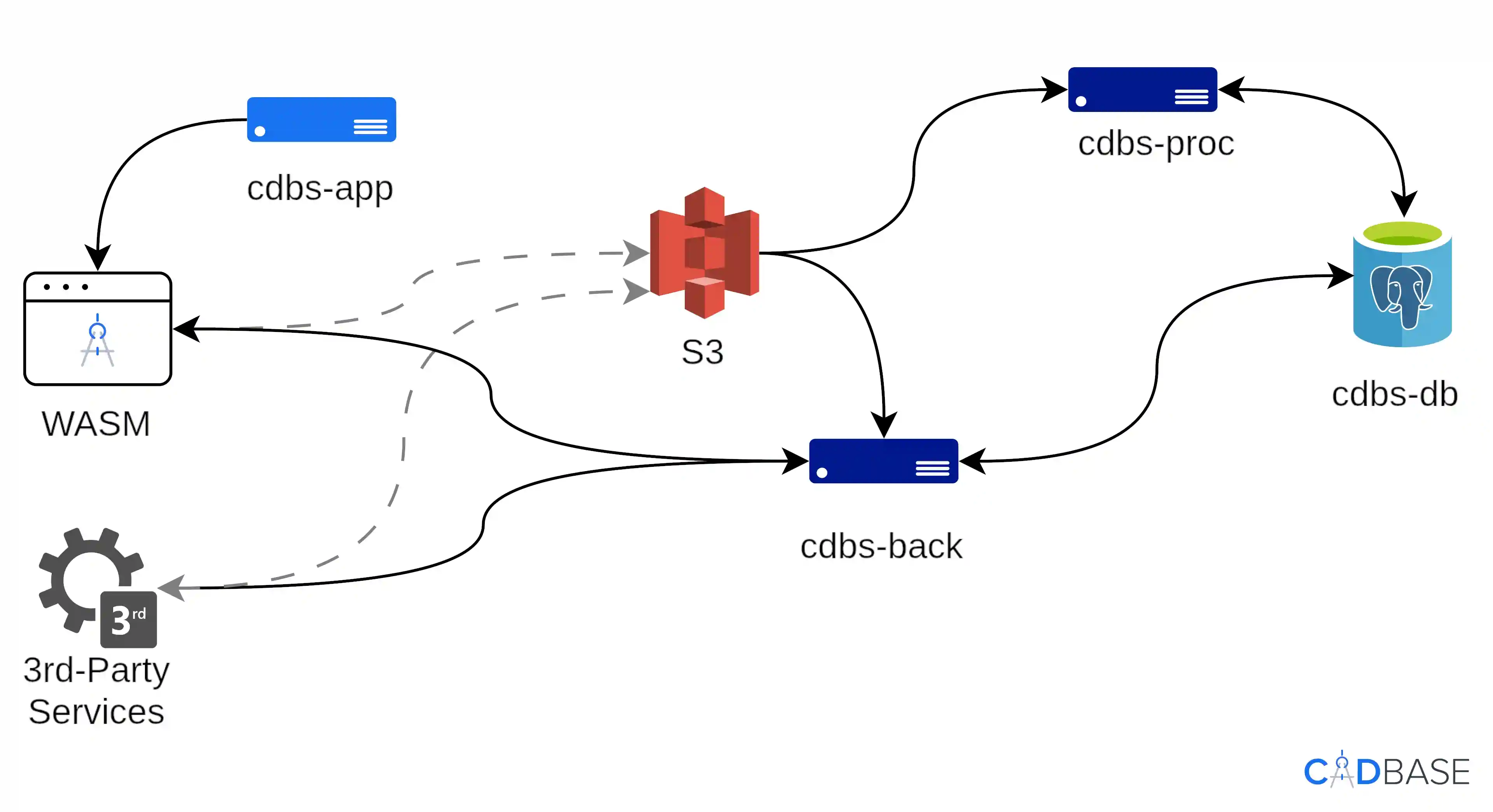
Purpose and Architecture of CADBase
CADBase is an open-source platform for storing engineering data, versioning, and visualizing 3D models in the browser. It integrates with CAD systems and other software via API.
This guide covers bringing up the entire stack (DB, API backend, background processor) with a single command, secrets isolation, and environment-specific configuration.
The platform is built on a three-level entity model. Component — a product card with shared metadata. Modification — a specific variant of the component (parameters, engineering documentation). File set — an isolated group of files for a specific tool within a modification.
Technology stack: backend — Rust (Actix-web, Tokio), frontend — Rust + WASM (Yew), 3D core — OCCT and Three.js (WebGPU/WebGL), infrastructure — Docker Compose / Kubernetes, PostgreSQL and S3-compatible storage.
Prerequisites
- OS: Linux (Ubuntu, Debian, Red OS, or other LTS distributions).
- Hardware: 4 vCPUs, 8 GB RAM, 30 GB disk (for the build, ~15 min).
- Utilities:
curl,git,docker(withdocker-compose), andopenssl. - Storage: S3-compatible (Garage, Ceph, SeaweedFS) — bucket access credentials required.
One-command installation
curl --proto '=https' --tlsv1.2 -sSLf https://gitlab.com/cadbase/cdbs-installer/-/raw/master/cdbs_start.sh | bashWhat happens
- Environment check: the script looks for
git,docker,openssl, andcurl. If something is missing, it will offer to install the utilities via your OS package manager (apt,dnf, oryum). - Configuration: the script creates the
cdbsfolder and asetup.configfile with defaults, then pauses — edit the parameters (S3, ports, passwords) and pressEnterto continue. - Cloning and build: syncing with repositories, building containers, preparing the database.
- SSL certificates: the script will ask whether to generate self-signed certificates or use your own. In the latter case, place
server.crtandserver.keyinto the./ssl/folder.
For a quick local test, press Enter on both prompts (the pause after configuration and the SSL choice): accept the default S3 stubs and generate a self-signed SSL certificate.
Note: to change S3, ports, or passwords after the platform is running, no reinstall is needed. Update setup.config and run the install command again.
Verifying the deployment
- Web UI: https://localhost:8080/
- GraphQL API Playground: http://localhost:3000/
Enterprise environment
Deploying into an enterprise IT infrastructure requires changes to setup.config.
Connecting to an external DBMS
Instead of a local container, a secure fault-tolerant PostgreSQL cluster is used. Access — via POSTGRES_USER, POSTGRES_PASSWORD, and POSTGRES_DB.
Connecting to corporate S3 storage
Enables Presigned URLs — signed links with limited-time access that do not expose S3 keys. Connection — via the S3_ENDPOINT, S3_REGION, S3_APPLICATION_KEY_ID, S3_APPLICATION_KEY, and S3_BUCKET variables.
Traffic encryption (HTTPS/TLS)
To protect confidential engineering data at the network edge, it is recommended to deploy a Reverse Proxy (Nginx, Traefik) that terminates SSL certificates on ports 80/443 and forwards traffic to the cdbs-back and cdbs-app containers.
Cheat sheet
All commands are run from the cdbs root, where docker-compose.yml resides.
View container list and status:
docker compose psAll containers (cdbs-db, cdbs-back, cdbs-proc, cdbs-app) should be in Started or Healthy state.
Restart the platform
docker compose restartStop the platform (keeping data)
docker compose downRemove the stack completely (disk cleanup)
docker compose down -vWarning: this fully removes the platform with all data — the PostgreSQL database and local Docker volumes.
View logs
Web app:
docker compose logs -f cdbs-appAPI server:
docker compose logs -f cdbs-backBackground processor:
docker compose logs -f cdbs-procDatabase:
docker compose logs -f cdbs-db